Purchase via Direct Contact
Customers may contact the GFI Partner directly via email or phone to request a purchase. In this case the GFI Partner needs to start the purchase request in the GFI Accounts Portal.
The Customer requires a trial license for this option. The GFI partner can create a new license if the customer does not have one. For more information refer to Creating a new License.
To start a new purchase request:
- Login to the GFI Accounts Portal.
- Go to Manage > License.
- Locate the license key of the product. Use the search for faster results. For more information refer to Locating an account.
- Select the license key.
- Select the end-user and under the
 icon, click Purchase.
 - Choose the Preferred term. The options are one, two or three years.
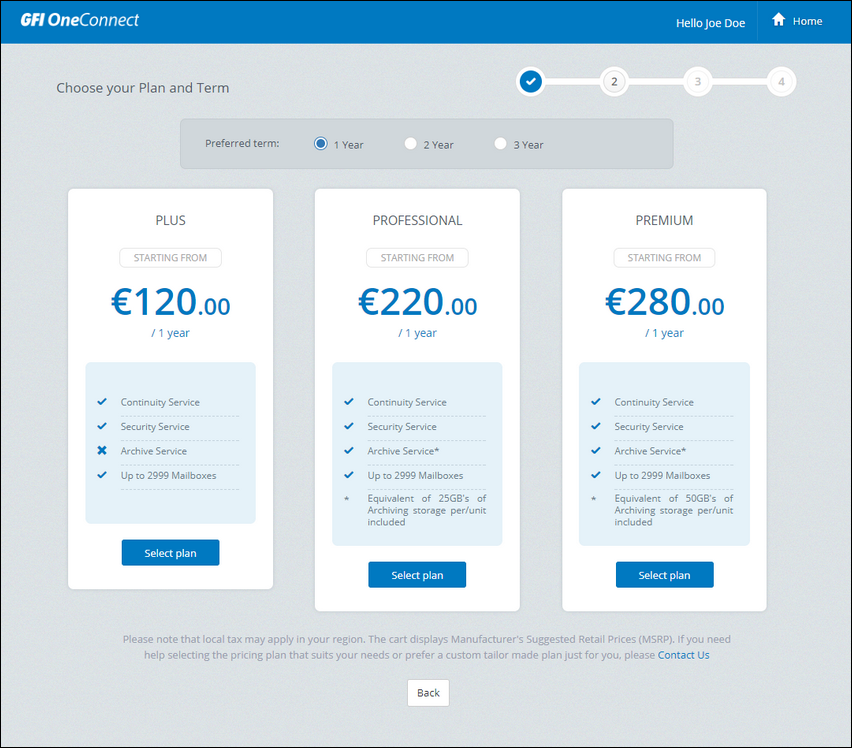
Plans available for the selected product
- Select one of the plans available by clicking Select Plan. The plans may vary according to the product.
- Revise your Payment Summary and click Proceed to checkout.
If you are the Reseller your request is forward to the Distributor. If are the Distributor you may proceed with the payment.
The customer is notified via email that the purchase is completed.