Configuration
The GFI OneGuard EndPoint ControlService used by GFI OneGuard to control access to devices. service can be configured per device or on a group of managed devices. This topic describes how to configure EndPoint Control protection for a group.
DevicesMachines connected to a network that have been discovered by GFI OneGuard. joined to a group inherit the protection settings configured on that group.
To access group EndPoint Control settings:
- Login to GFI OneGuard.
- Go to Manage > Devices.
- In the left pane, under Managed Groups, hover your mouse over the group you want to configure.
- Click the pulldown menu arrow
 and select Configure group.
 - Go to the EndPoint Control tab to start customizing settings in this group.
 Enabling/Disabling EndPoint Control
Use the switch Enable EndPoint Control policy for this group to enable or disable EndPoint Control protection.
When EndPoint Control is enabled, you may proceed to configure the other settings.
When EndPoint Control is disabled, no other settings configuration are needed and you can click Save Settings. When the EndPoint Control service is disabled the EndPoint agentA GFI OneGuard component that runs as a background service on target devices and handles the deployment of patches, service packs and software updates. gets uninstalled from the affected devices.
Inherit policy from parent group
Use the Inherit policy from parent group option to automatically inherit settings from the parent group, according to the hierarchy shown in the Managed Groups section in the left pane. If this option is selected, the options below this setting are hidden.
Import or Export a Policy
You can use these options to export an EndPoint Control policy from an existing GFI OneGuard deployment or group and import them into another. This is useful for example when moving your GFI OneGuard installation from one server to another, or setting up policies for different groups.
Select from the following options:
Access Rules
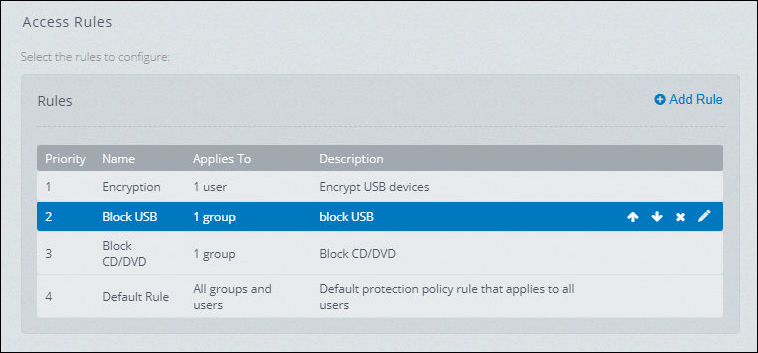
Access Rules order
The Access Rules policy define Endpoint Control rules based on users and groups and set the priority of rule execution.
Rules are executed from top to bottom and once a match is found the other policies are no longer applied. Thus, it is advisable to place the most specific rules to block on top and leave a default rule on the bottom that ensures the access to every device that should be used in the network.
Policy Checker
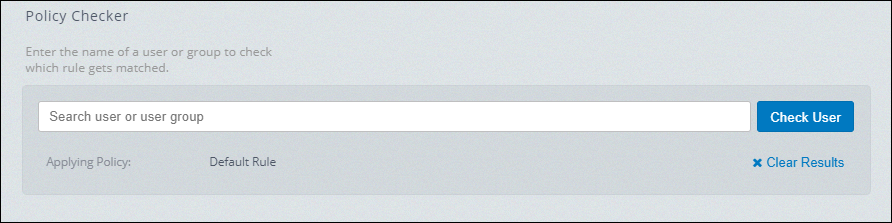
Policy Checker displays the policy applied to a user
The policy Checker allows you to verify which rule applies to a particular user. Enter the name of a user or group and click Check User. The name of the rule applied to the user is displayed next to Applying Policy.
Click Clear Results to erase the actual result and start a new check.