Updating existing licenses to a GFI Unlimited license
Customers that already have another subscription type with GFI can also benefit from GFI Unlimited.
For an existing customer to utilize a GFI Product through their GFI Unlimited subscription, that product license needs to be upgraded. The upgrade process generates a license key that can be used to run the software.
GFI Unlimited product upgrades can either be done by the customers themselves from the GFI Accounts Portal, or by the GFI partner on behalf of the customer.
NOTE
Partners should have their customer details at hand to be able to proceed. If required you can use the GFI Accounts Portal to locate your customer details.
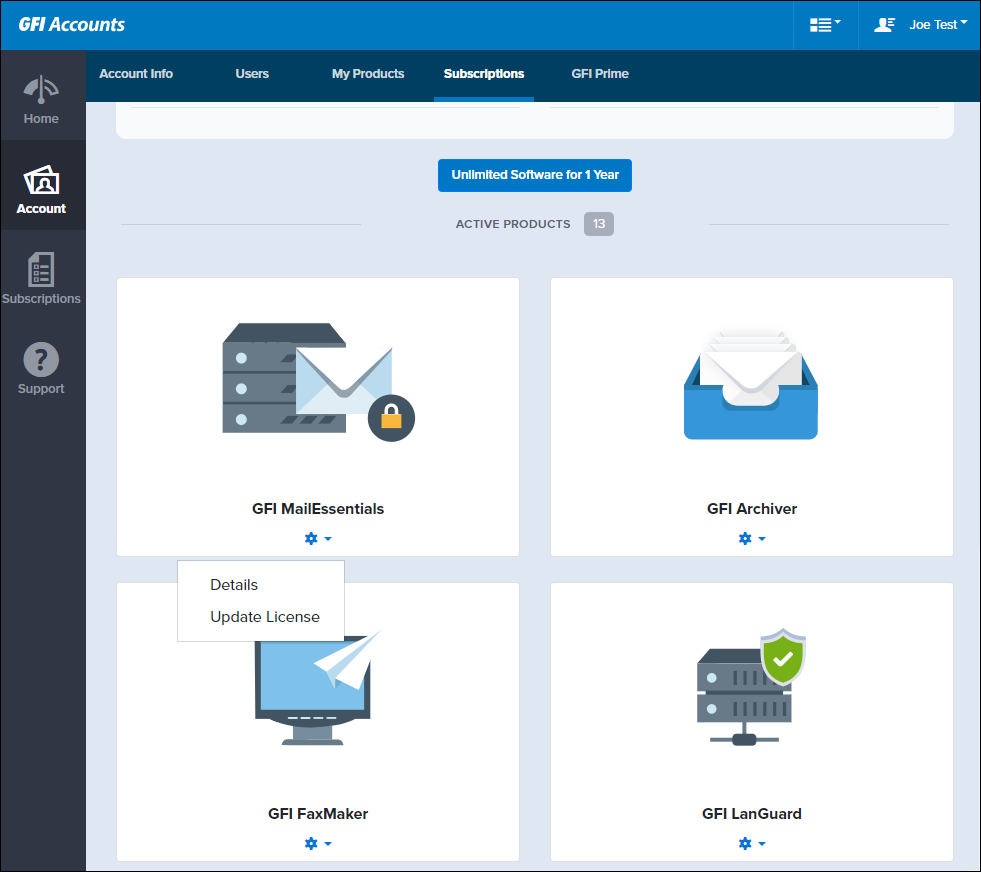
Update License option under subscriptions
There are two methods to upgrade a product:
Upgrading to GFI Unlimited automatically
A GFI product can be updated automatically:
- Login to the GFI Accounts Portal
- Go to Account > Subscriptions.
- Select Update License on specific product that you would like to use.
- The summary page is displayed. After reviewing the information, click Update.
- A summary of your product is displayed, including the GFI Unlimited license key. Click Okay.
Upgrading to GFI Unlimited manually
Products that cannot be updated automatically, require the GFI Orders team to send you the license key:
- Login to the GFI Accounts Portal
- Go to Account > Subscriptions.
- Select Update License on the specific product that you would like to use.
- The summary page is displayed. After reviewing the information, click Update.
- The update request is then sent to the GFI Orders team for processing. Click Okay.
Customers and partners are notified once the upgrade is complete and the upgraded license is ready to use.