Risk Assessment view
Use the Risk Assessment sub-tab to view the status of:
- Risk assessment level on the network computers with GFI EndPointSecurity agents installed on them.
- GFI EndPointSecurity agents deployed on network computers.
- Device usage such as the number and percentage of devices blocked and the number of devices allowed.
- Device threat level of devices on the network.
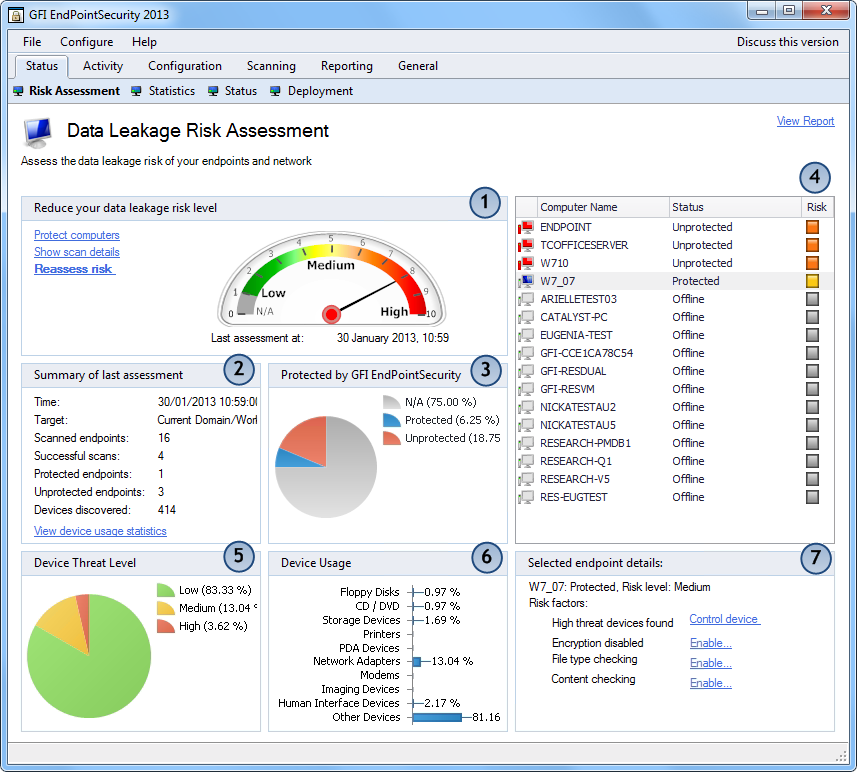
Risk Assessment sub-tab
To access the Risk Assessment sub-tab, from GFI EndPointSecurity management console click Status tab > Risk Assessment.
| Feature | Description |
|---|---|

|
This section shows:
|

|
This section lists the cumulative values of the number of:
This section also represents:
|

|
This section graphically represents the number of agents that are currently:
|

|
This section represents all agents deployed on network computers, differentiating between those currently online and those that are offline. For more information refer to Status view. |

|
This section graphically represents the device threat percentage levels as logged by the agents of network computers that have GFI EndPointSecurity installed on them. |

|
This section graphically represents the percentages of user accesses per device category of the total cumulative amount of user accesses to devices, as logged by the agents. User accesses to devices refer to both allowed and blocked device accesses. |

|
This section lists:
|